

SyF Cinematography Tool – Free DaVinci Resolve & Vegas Pro Plugins
Get a free OFX cinematography tool for Vegas Pro and check your exposure, skin tones, and framing in one effect!
The SyF Cinematography Tool puts the checks you’d normally need several plugins for into a single panel. Switch on false color to read your exposure, drop in a skin tone reference, lay a composition grid over your shot, and add cinematic crop bars when you’re ready. GPU acceleration keeps it responsive while you work.
- One-Click False Color Exposure Check
- One-Click Skin Tone & Middle Gray References
- One-Click Composition Guides
- One-Click Cinematic Crop Bars
Description
A Free OFX Cinematography Tool for Checking and Framing Your Shot
Judging exposure by eye is unreliable, and checking skin tones, framing, and levels usually means juggling several separate tools. The SyF Cinematography Tool is a free OFX cinematography tool for Vegas Pro that gathers those checks into one effect, in four clear sections you can switch on one at a time.
Reference It
These are the tools for judging a shot.
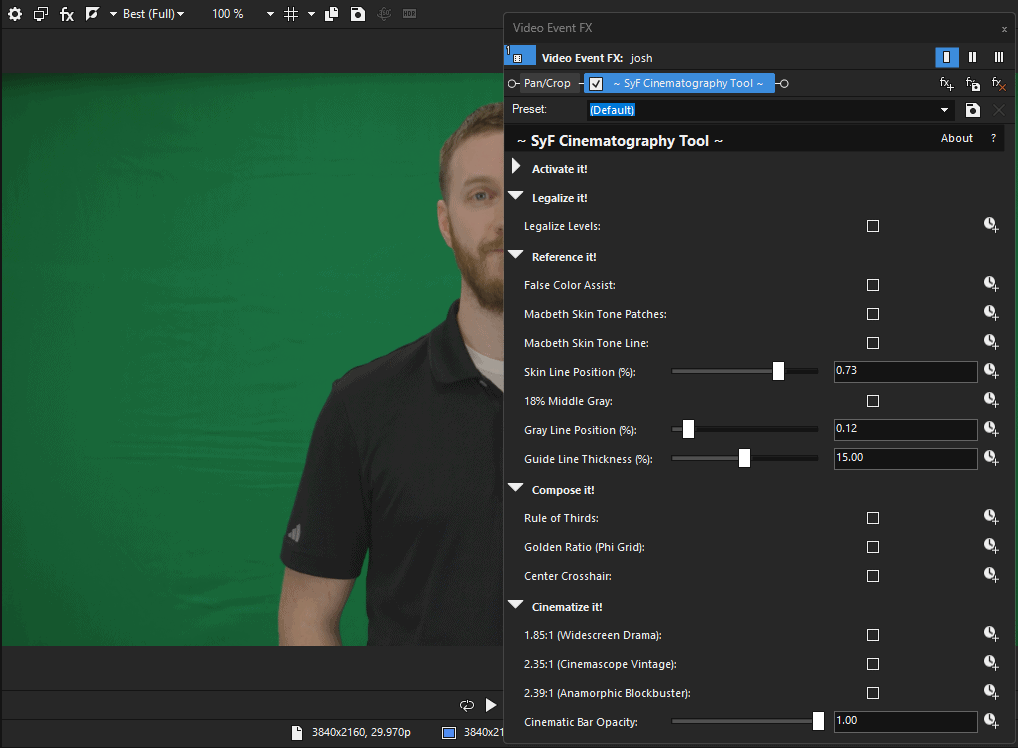
- False Color Assist: turns the picture into a map of brightness zones. Deep shadows below 5 percent show as purple, near-black from 5 to 10 percent as blue, 40 to 45 percent as green, 52 to 58 percent as pink, and anything above 95 percent as red, so you can see crushed blacks and blown highlights at a glance. Everything else stays gray.
- Macbeth Skin Tone Patches: two reference patches based on the light skin and dark skin colors of the Macbeth ColorChecker chart, to hold your own skin tones up against.
- Macbeth Skin Tone Line: a gradient bar that runs from a saturated light skin tone through black to a saturated dark skin tone. Use it with the patches or on its own.
- 18% Middle Gray: a solid middle gray band as an exposure reference.
Position the skin tone bar and the gray band anywhere vertically in the frame with the Skin Line Position and Gray Line Position sliders, and set how tall they are with Guide Line Thickness.
Compose It
Lay a framing guide over your shot: a Rule of Thirds grid, a Golden Ratio (Phi Grid) with lines at 38.2 and 61.8 percent, or a Center Crosshair. Turn them on in any combination.
Cinematize It
Add black crop bars to turn any frame into a widescreen one. Choose 1.85:1 for widescreen drama, 2.35:1 for the vintage Cinemascope look, or 2.39:1 for the anamorphic blockbuster look. A Cinematic Bar Opacity slider lets you make the bars solid or see through them.
Legalize It
One checkbox scales your levels from full range (0 to 255) into the legal range of 16 to 235, for deliveries that require legal levels.
Know What Ends Up in the Render
Everything you switch on is drawn into the picture, including false color and the guides, so turn the reference tools off before you render your final video. The crop bars and Legalize Levels are the ones meant to stay on. It works in 8-bit and 32-bit floating point projects.
GPU-Accelerated, With a Real Fallback Chain
The render tries an NVIDIA CUDA device first, falls back to OpenCL for any other GPU, and only drops to the CPU if neither is available. It stays fast on the widest range of machines, not just one brand of graphics card. One checkbox turns GPU acceleration off.
System Requirements
OS: Windows 10 / 11 (64-bit)
Host Software: Vegas Pro 15+ (Recommended). Works in 8-bit and 32-bit floating point projects.
License: Free, yours forever. No license key or activation required.
Installation Guide
Download the installer.
Run the installer.
(Note for Windows Users: As an indie developer, you may see a blue SmartScreen warning upon installation. Click “More Info” -> “Run Anyway” to install.)
Open Vegas Pro and navigate to the Video FX tab. Under the Scrapyard Films Plugins! group, you’ll see:
~ SyF Cinematography Tool ~
Drag the free OFX cinematography tool onto your clip and it’s ready to use immediately, no license key required. If you find it useful, there’s an optional Support button inside the plugin if you’d like to buy me a coffee!
Version Update History:
v1.0 – Launched the program with all base features
v1.14 – Current version
Related products
-
SyF Color Shifter Pro – Free Vegas Pro Plugins
Download Installer252 downloads -

SyF Revolver Pro – Free Vegas Pro Plugins
Download Installer499 downloads -

SyF Audio Velocity – Free VST3 Plugins
Download Installer303 downloads -

SyF Animated Background Pro – Free Vegas Pro Plugins
Download Installer253 downloads