
SyF Motion Blur Pro
Add realistic, motion-aware blur to any clip in one click inside Vegas Pro, DaVinci Resolve, and other hosts that support OFX plugins!
The SyF Motion Blur Pro analyzes the real motion between frames and blurs each pixel along its own path, instead of a single flat direction slapped across the whole image. Pick from multiple estimation modes built for different kinds of motion, from general handheld footage to a clean pan, a spin, or a zoom, and let GPU acceleration keep it smooth while you work.
- One-Click Motion-Aware Blur
- One-Click Specialized Pan, Spin & Zoom Modes
- One-Click GPU-Accelerated Rendering
- One-Click Quality/Speed Trade-Off Control
Description
Blur That Follows the Actual Motion
Most motion blur plugins just smear every pixel the same fixed direction and call it done. The SyF Motion Blur Pro actually looks at what changed between one frame and the next, and blurs every pixel along its own real path — so a title sliding across the screen, something spinning in place, and a background pulling away behind it all get the direction and length of blur they actually earned, not a one-size-fits-all approximation.
Pick the Right Tool for the Motion
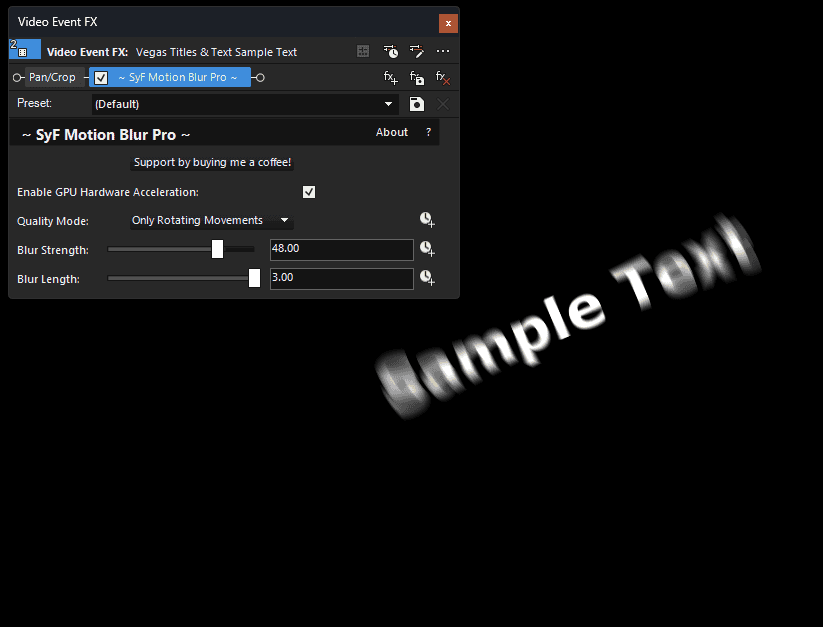
Different kinds of movement are easiest to nail with different approaches, so Motion Blur Pro gives you a Quality Mode dropdown instead of forcing one algorithm to handle everything:
- High Quality — full per-pixel motion analysis for arbitrary footage, including a subject and its background moving independently of each other.
- Fast — a lighter version of the same analysis, for quick scrubbing while you’re still positioning things.
- Linear — built specifically for something sliding in a straight line, fast and clean when that’s all you need.
- Rotating — built specifically for something spinning in place.
- Zooming — built specifically for a push in or pull out.
Need more than one at once, like something that’s both spinning and pulling back? Stack multiple copies of the plugin, each set to a different mode — they combine cleanly.
GPU-Accelerated, With a Real Fallback Chain
The expensive part of the render tries an NVIDIA CUDA device first, falls back to OpenCL for any other GPU, and only drops to CPU if neither is available — so it stays fast on the widest range of machines, not just one brand of graphics card.
Simple Controls, No Guesswork
Two sliders — Blur Strength (how smooth) and Blur Length (how far) — are completely independent of each other, so dialing in a look never means fighting one setting to compensate for another.
System Requirements
OS: Windows 10 / 11 (64-bit)
Host Software: VEGAS Pro 15+ (Recommended)
License: Perpetual (One-time purchase, yours forever).
Installation Guide
Download the installer.
Run the installer.
(Note for Windows Users: As an indie developer, you may see a blue SmartScreen warning upon installation. Click “More Info” -> “Run Anyway” to install.)
Open Vegas Pro and navigate to the Video FX tab. At the top, you’ll see:
~ Motion Blur Pro ~
Drag it onto your track — it’s ready to use immediately, no license key required. If you find it useful, there’s an optional Support button inside the plugin if you’d like to buy me a coffee!
Version Update History:
v1.0 – Launched the program with all base features
Related products
-

SyF Animated Background Pro
Download Installer133 downloads -
SyF Color Shifter Pro
Download Installer127 downloads -

SyF Film Emulation Pro
Download Installer123 downloads -

SyF Audio Velocity
Download Installer174 downloads