

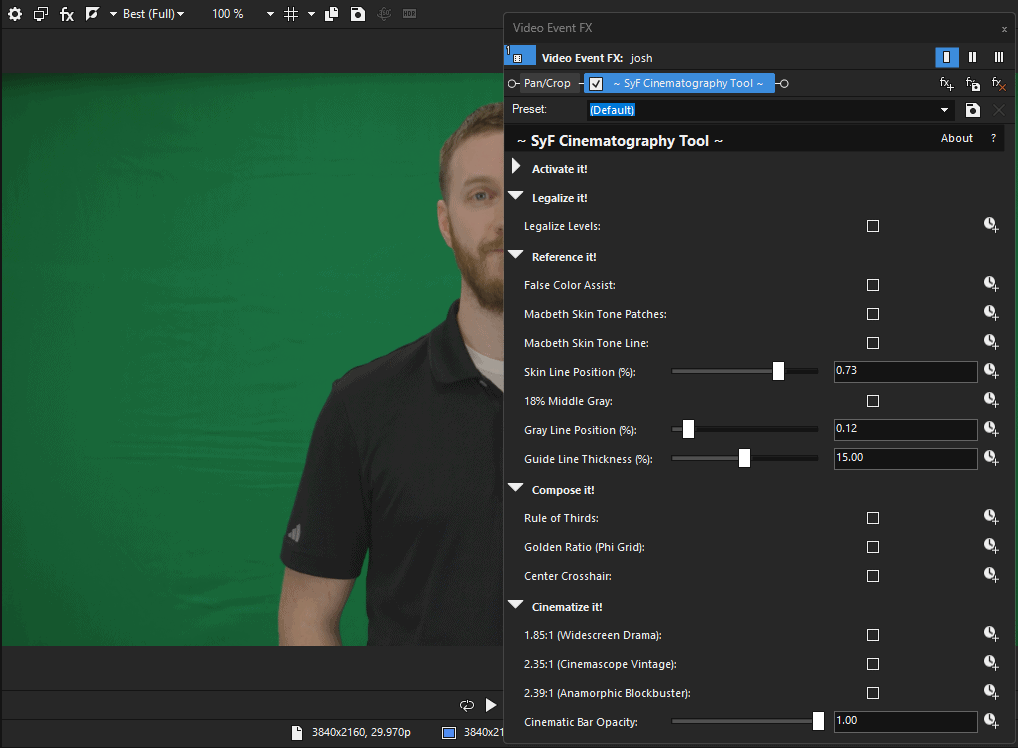
SyF Cinematography Tool
Unlock professional and convenient color grading tools in one-click inside VEGAS Pro!
The SyF Cinematography Tool removes the guesswork from editing. Instantly verify skin tones, nail your exposure with False Color overlays, and frame your shots with industry-standard cinematic crops. Light on resources, heavy on utility.
One-Click Perfect Macbeth Skin Tones
One-Click False Colors
One-Click Broadcast Legalize
One-Click Cinematic Aspect Ratio Crops
Description
Grade Like a Pro, Right Inside Your Timeline.
For years, professional colorists have relied on expensive hardware scopes and complex software to nail their image. Now, you can have those same diagnostic tools directly inside VEGAS Pro!
The SyF Cinematography Tool is designed for filmmakers who need speed and accuracy. No more “eyeballing” your exposure or wondering if your talent looks too red or too green. Turn on the tools you need, make your adjustments, and turn them off—all without leaving your editing software.
Plugin Features:
Precision Skin Tones
Stop struggling with sickly skin tones. The calibrated Macbeth Skin Tone Line draws a reference vector right on your screen. Simply line up your talent’s skin tone with the guide, and you are guaranteed natural, accurate color every time.
False Color Exposure Assist
Read your lighting instantly. False Color maps the brightness values of your image to specific colors, allowing you to see exactly where your highlights are clipping or your shadows are crushed.
Composition Guides & Crops
Frame your masterpiece. Overlay Rule of Thirds, Golden Ratio, or Center Crosshairs to nail your composition. When you’re ready to export, apply industry-standard cinematic black bars with a single click.
Broadcast Safe “Legalize”
Delivering for TV or a strict streaming platform? The Legalize Levels checkbox instantly clamps your signal to broadcast-safe limits (16-235), ensuring your video never gets rejected for illegal luma levels.
System Requirements
OS: Windows 10 / 11 (64-bit)
Host Software: VEGAS Pro 15+ (Recommended)
License: Perpetual (One-time purchase, yours forever).
Installation Guide
Download the installer after purchase.
Run SyFCinematographerTool_Setup.exe
(Note for Windows Users: As an indie developer, you may see a blue SmartScreen warning upon installation. Click “More Info” -> “Run Anyway” to install.)
Open VEGAS Pro and navigate to the Video FX tab. At the top, you’ll see:
~ SyF Cinematography Tool ~.
Related products
-

SyF Animated Background Pro
Download Installer2 downloads -

SyF Audio Velocity
Download Installer2 downloads -
SyF Color Shifter Pro
Download Installer2 downloads -

SyF Film Emulation Pro
Download Installer2 downloads